Arize Phoenix 集成
Arize Phoenix 集成
Section titled “Arize Phoenix 集成”本指南演示如何通过 OpenInference SDK 使用 OpenTelemetry 将 Arize Phoenix 与 CrewAI 集成。读完本指南后,你将能够追踪 CrewAI 代理,并轻松调试你的代理。
什么是 Arize Phoenix? Arize Phoenix 是一个 LLM 可观测性平台,提供 AI 应用的追踪和评估能力。
我们将通过一个简单示例,展示如何使用 CrewAI,并借助 OpenInference 通过 OpenTelemetry 将其与 Arize Phoenix 集成。
你也可以在 Google Colab 中访问本指南。
步骤 1:安装依赖
Section titled “步骤 1:安装依赖”pip install openinference-instrumentation-crewai crewai crewai-tools arize-phoenix-otel步骤 2:设置环境变量
Section titled “步骤 2:设置环境变量”设置 Phoenix Cloud API keys,并配置 OpenTelemetry 将追踪发送到 Phoenix。Phoenix Cloud 是 Arize Phoenix 的托管版本,但使用此集成并不需要它。
你可以在 这里 获取免费的 Serper API key。
import osfrom getpass import getpass
# 获取你的 Phoenix Cloud 凭据PHOENIX_API_KEY = getpass("🔑 Enter your Phoenix Cloud API Key: ")
# 获取各项服务的 API keysOPENAI_API_KEY = getpass("🔑 Enter your OpenAI API key: ")SERPER_API_KEY = getpass("🔑 Enter your Serper API key: ")
# 设置环境变量os.environ["PHOENIX_CLIENT_HEADERS"] = f"api_key={PHOENIX_API_KEY}"os.environ["PHOENIX_COLLECTOR_ENDPOINT"] = "https://app.phoenix.arize.com" # Phoenix Cloud,如果你使用自托管实例,请改为你自己的端点os.environ["OPENAI_API_KEY"] = OPENAI_API_KEYos.environ["SERPER_API_KEY"] = SERPER_API_KEY
步骤 3:使用 Phoenix 初始化 OpenTelemetry
Section titled “步骤 3:使用 Phoenix 初始化 OpenTelemetry”初始化 OpenInference OpenTelemetry 检测 SDK,以开始捕获追踪并将其发送到 Phoenix。
from phoenix.otel import register
tracer_provider = register(    project_name="crewai-tracing-demo",    auto_instrument=True,)
步骤 4:创建 CrewAI 应用
Section titled “步骤 4:创建 CrewAI 应用”我们将创建一个 CrewAI 应用,其中两个代理协作研究并撰写一篇关于 AI 进展的博客文章。
from crewai import Agent, Crew, Process, Taskfrom crewai_tools import SerperDevToolfrom openinference.instrumentation.crewai import CrewAIInstrumentorfrom phoenix.otel import register
# 为你的 crew 设置监控tracer_provider = register(    endpoint="http://localhost:6006/v1/traces")CrewAIInstrumentor().instrument(skip_dep_check=True, tracer_provider=tracer_provider)search_tool = SerperDevTool()
# 定义带有角色和目标的代理researcher = Agent(    role="Senior Research Analyst",    goal="Uncover cutting-edge developments in AI and data science",    backstory="""You work at a leading tech think tank.    Your expertise lies in identifying emerging trends.    You have a knack for dissecting complex data and presenting actionable insights.""",    verbose=True,    allow_delegation=False,    # 你可以传入一个可选的 llm 属性,用于指定你想使用的模型。    # llm=ChatOpenAI(model_name="gpt-3.5", temperature=0.7),    tools=[search_tool],)writer = Agent(    role="Tech Content Strategist",    goal="Craft compelling content on tech advancements",    backstory="""You are a renowned Content Strategist, known for your insightful and engaging articles.    You transform complex concepts into compelling narratives.""",    verbose=True,    allow_delegation=True,)
# 为你的代理创建任务task1 = Task(    description="""Conduct a comprehensive analysis of the latest advancements in AI in 2024.    Identify key trends, breakthrough technologies, and potential industry impacts.""",    expected_output="Full analysis report in bullet points",    agent=researcher,)
task2 = Task(    description="""Using the insights provided, develop an engaging blog    post that highlights the most significant AI advancements.    Your post should be informative yet accessible, catering to a tech-savvy audience.    Make it sound cool, avoid complex words so it doesn't sound like AI.""",    expected_output="Full blog post of at least 4 paragraphs",    agent=writer,)
# 使用顺序流程实例化你的 crewcrew = Crew(    agents=[researcher, writer], tasks=[task1, task2], verbose=1, process=Process.sequential)
# 让你的 crew 开始工作!result = crew.kickoff()
print("######################")print(result)
步骤 5:在 Phoenix 中查看追踪
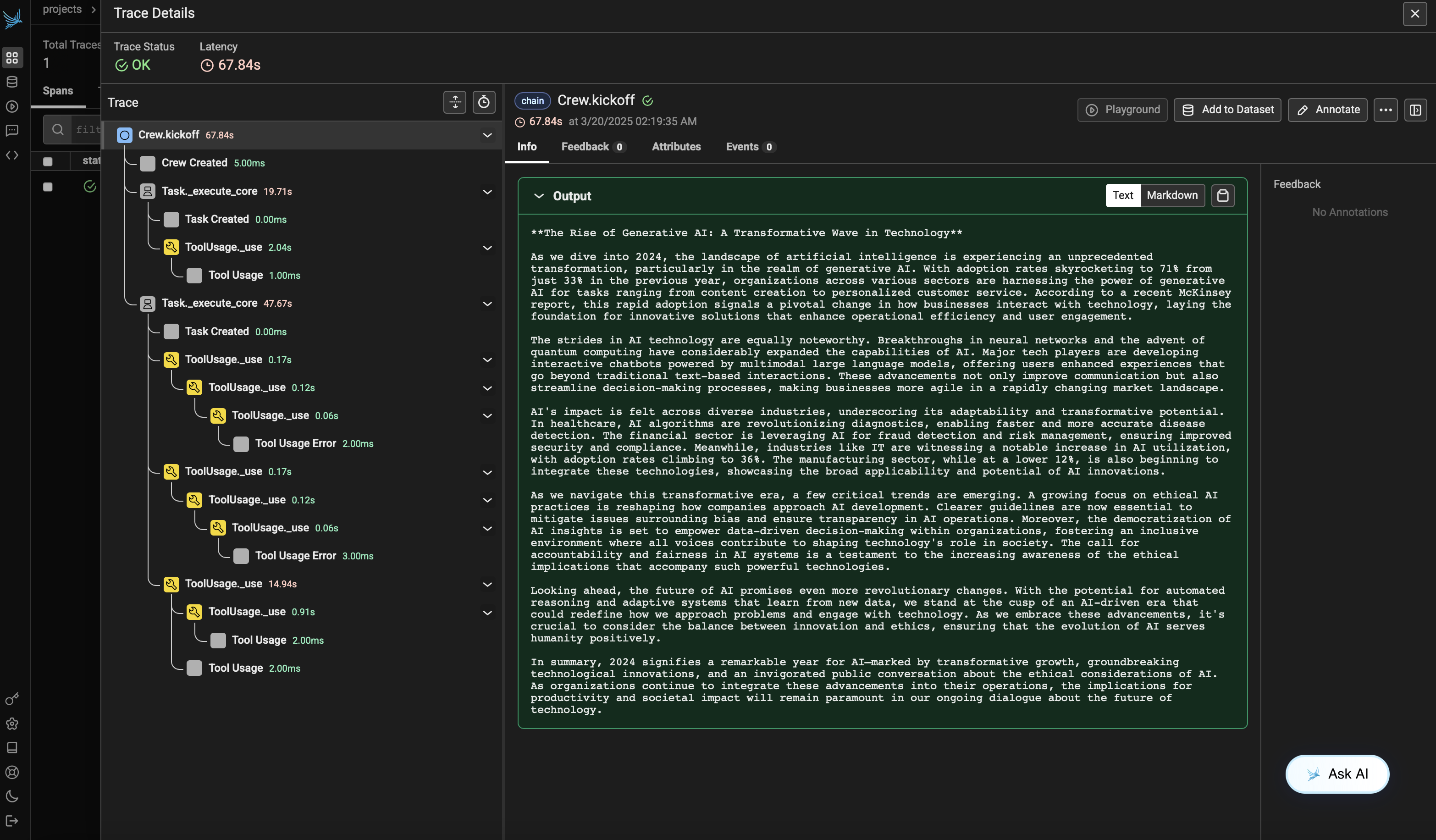
Section titled “步骤 5:在 Phoenix 中查看追踪”运行代理后,你可以在 Phoenix 中查看由 CrewAI 应用生成的追踪。你应该能看到代理交互和 LLM 调用的详细步骤,这有助于你调试和优化 AI 代理。
登录你的 Phoenix Cloud 账户,并导航到你在 project_name 参数中指定的项目。你会看到 trace 的时间线视图,其中包含所有代理交互、工具使用和 LLM 调用。
版本兼容性信息
Section titled “版本兼容性信息”- Python 3.8+
- CrewAI >= 0.86.0
- Arize Phoenix >= 7.0.1
- OpenTelemetry SDK >= 1.31.0
- Phoenix 文档 - Phoenix 平台概览
- CrewAI 文档 - CrewAI 框架概览
- OpenTelemetry 文档 - OpenTelemetry 指南
- OpenInference GitHub - OpenInference SDK 源代码