基于角色的访问控制(RBAC)
CrewAI AMP 中的 RBAC 通过两层来实现安全、可扩展的访问管理:
- Feature permissions - 控制每个 role 在平台上能做什么(manage、read 或 no access)
- Entity-level permissions - 对单个 automations、environment variables、LLM connections 和 Git repositories 的细粒度访问控制
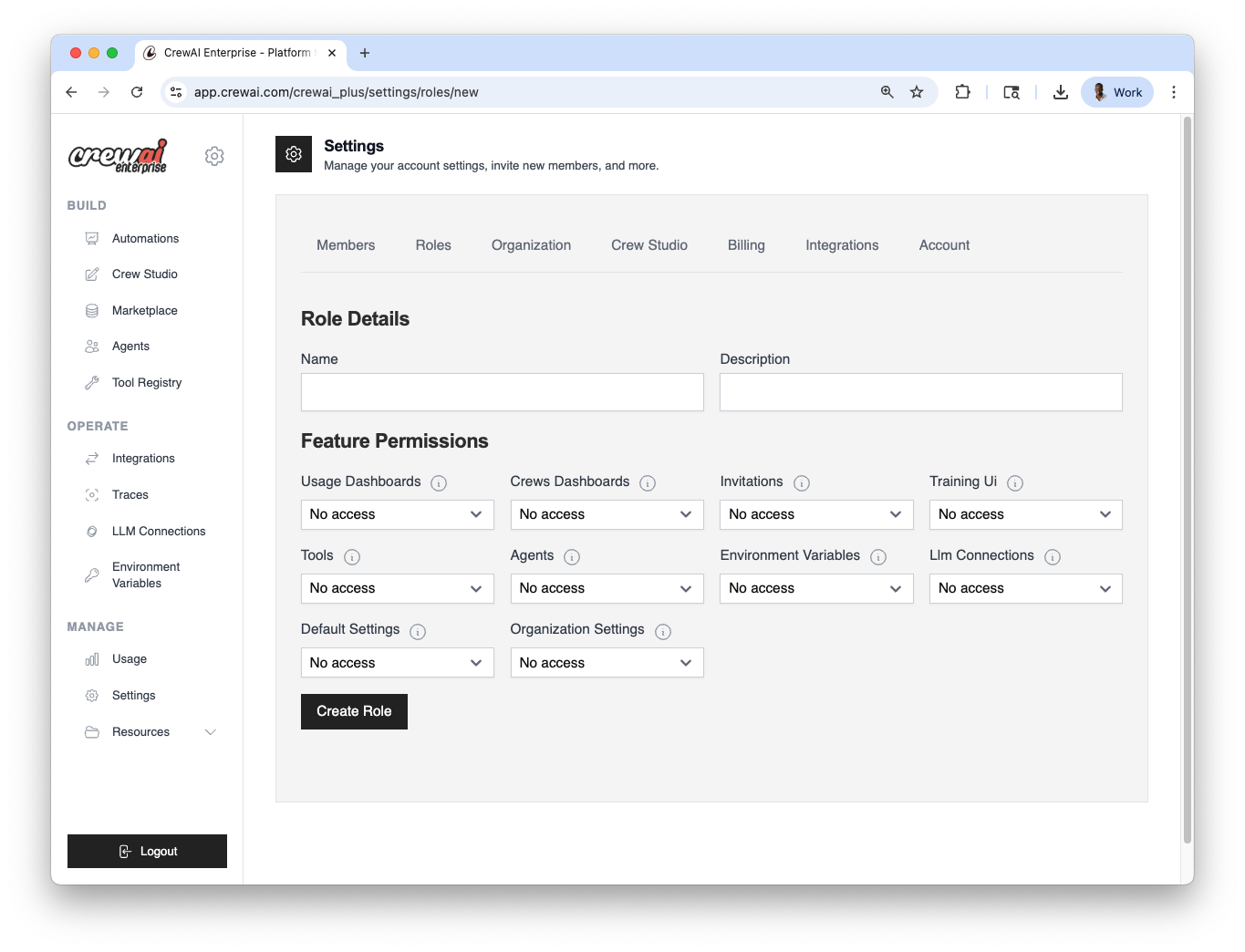
CrewAI workspace 中的每个成员都会被分配一个 role,该 role 决定了他们对各项功能的访问范围。
你可以:
- 使用预定义 roles(Owner、Member)
- 创建符合特定权限需求的自定义 roles
- 随时通过设置面板分配 roles
你可以在 Settings → Roles 中配置用户和角色。
- 打开 Roles 设置
在 CrewAI AMP 中进入 Settings → Roles。
- 选择 role 类型
使用预定义 role(Owner、Member),或者点击 Create role 定义一个自定义 role。
- 分配给成员
选择用户并分配 role。你可以随时更改。
预定义 Roles
Section titled “预定义 Roles”| Role | Description |
|---|---|
| Owner | 拥有所有功能和设置的完整访问权限。不能被限制。 |
| Member | 对大多数功能有只读访问权限,可管理环境变量、LLM connections 和 Studio projects 的访问权限。不能修改组织或默认设置。 |
| Area | Where to configure | Options |
|---|---|---|
| Users & Roles | Settings → Roles | Predefined: Owner, Member; Custom roles |
| Automation visibility | Automation → Settings → Visibility | Private; Whitelist users/roles |
功能权限矩阵
Section titled “功能权限矩阵”每个 role 对每个功能区域都有一个权限级别。三个级别分别是:
- Manage - 完整读写权限(create、edit、delete)
- Read - 仅查看
- No access - 功能隐藏/不可访问
| Feature | Owner | Member (default) | Available levels | Description |
|---|---|---|---|---|
usage_dashboards | Manage | Read | Manage / Read / No access | 查看使用指标和分析 |
crews_dashboards | Manage | Read | Manage / Read / No access | 查看部署仪表板,访问 automation 详情 |
invitations | Manage | Read | Manage / Read / No access | 邀请新成员加入组织 |
training_ui | Manage | Read | Manage / Read / No access | 访问 training/fine-tuning 界面 |
tools | Manage | Read | Manage / Read / No access | 创建和管理 tools |
agents | Manage | Read | Manage / Read / No access | 创建和管理 agents |
environment_variables | Manage | Manage | Manage / No access | 创建和管理环境变量 |
llm_connections | Manage | Manage | Manage / No access | 配置 LLM provider connections |
default_settings | Manage | No access | Manage / No access | 修改组织级默认设置 |
organization_settings | Manage | No access | Manage / No access | 管理账单、套餐和组织配置 |
studio_projects | Manage | Manage | Manage / No access | 在 Studio 中创建和编辑 projects |
通过 GitHub 或 Zip 部署
Section titled “通过 GitHub 或 Zip 部署”最常见的 RBAC 问题之一是:“团队成员需要什么权限才能部署?”
从 GitHub 部署
Section titled “从 GitHub 部署”要从 GitHub 仓库部署 automation,用户需要:
crews_dashboards:至少Read- 这是访问创建部署的 automations dashboard 所必需的- Git repository 访问(如果启用了 Git repositories 的 entity-level RBAC):用户的 role 必须通过 entity-level permissions 获得对特定 Git repository 的访问
studio_projects:Manage- 如果你在部署前先在 Studio 中构建 crew
从 Zip 部署
Section titled “从 Zip 部署”要通过 Zip 文件上传部署 automation,用户需要:
crews_dashboards:至少Read- 这是访问 automations dashboard 所必需的- 已启用 Zip deployments:组织不能在 organization settings 中禁用了 zip deployments
部署所需的最低权限快速参考
Section titled “部署所需的最低权限快速参考”| Action | Required feature permissions | Additional requirements |
|---|---|---|
| Deploy from GitHub | crews_dashboards: Read | Git repo entity access (if Git RBAC is enabled) |
| Deploy from Zip | crews_dashboards: Read | Zip deployments must be enabled at the org level |
| Build in Studio | studio_projects: Manage | — |
| Configure LLM keys | llm_connections: Manage | — |
| Set environment vars | environment_variables: Manage | Entity-level access (if entity RBAC is enabled) |
Automation 级别访问控制(Entity Permissions)
Section titled “Automation 级别访问控制(Entity Permissions)”除了组织级 roles 之外,CrewAI 还支持细粒度的 entity-level permissions,用于限制对单个资源的访问。
Automation 可见性
Section titled “Automation 可见性”Automations 支持 visibility settings,可按用户或 role 限制访问。这在以下场景中很有用:
- 保持敏感或实验性 automations 的私密性
- 在大型团队或外部协作者之间管理可见性
- 在隔离的上下文中测试 automations
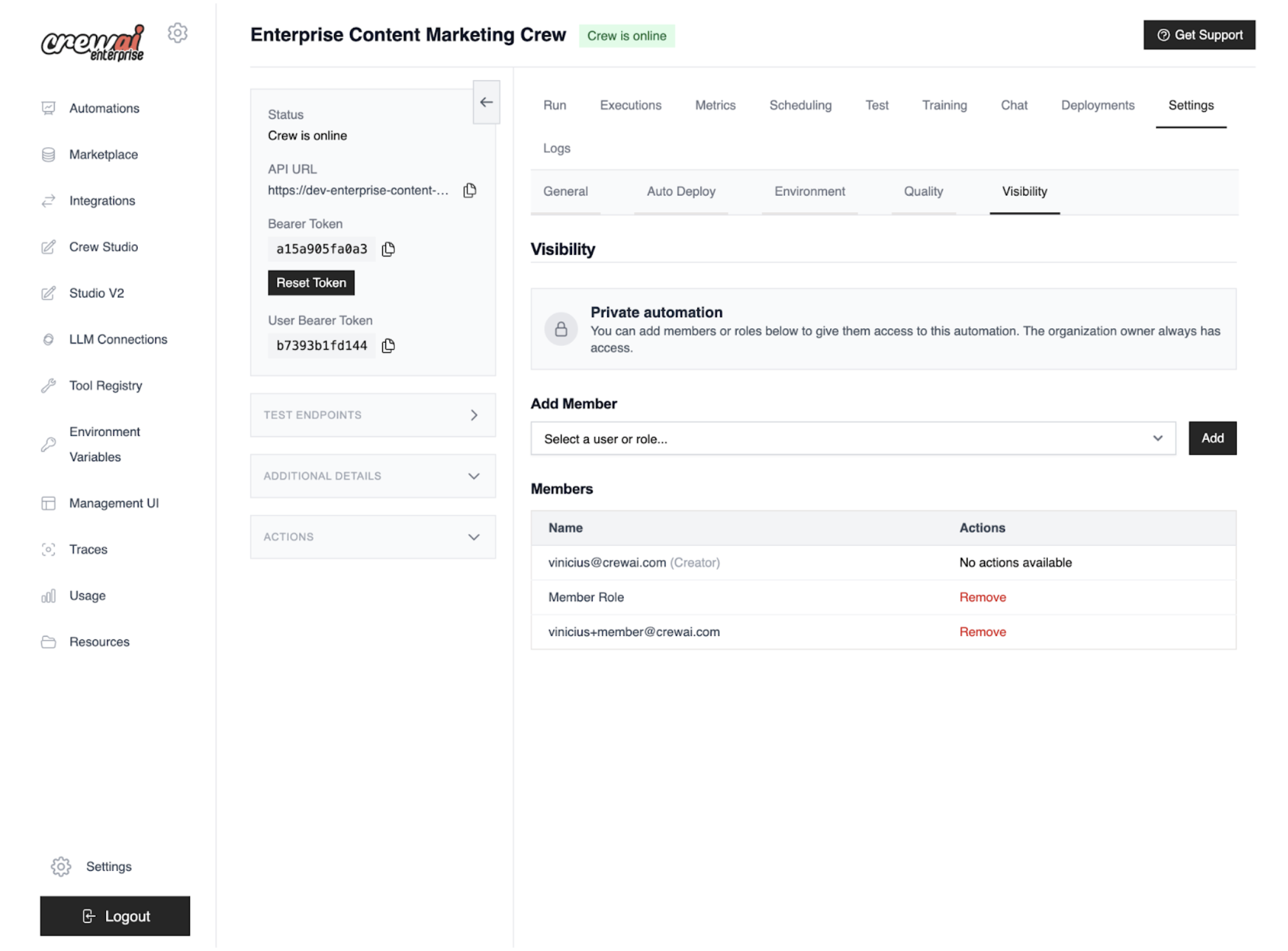
部署可以配置为 private,这意味着只有在白名单中的 users 和 roles 才能与其交互。
你可以在 Automation → Settings → Visibility tab 中配置 automation-level access control。
- 打开 Visibility tab
导航到 Automation → Settings → Visibility。
- 设置可见性
选择 Private 来限制访问。组织所有者始终保留访问权限。
- 加入白名单
添加被允许查看、运行以及访问 logs/metrics/settings 的特定 users 和 roles。
- 保存并验证
保存更改,然后确认未被加入白名单的用户无法查看或运行该 automation。
私有可见性:访问结果
Section titled “私有可见性:访问结果”| Action | Owner | Whitelisted user/role | Not whitelisted |
|---|---|---|---|
| View automation | ✓ | ✓ | ✗ |
| Run automation/API | ✓ | ✓ | ✗ |
| Access logs/metrics/settings | ✓ | ✓ | ✗ |
部署权限类型
Section titled “部署权限类型”当你为某个特定 automation 授予 entity-level access 时,可以分配以下 permission types:
| Permission | What it allows |
|---|---|
run | 执行该 automation 并使用其 API |
traces | 查看 execution traces 和 logs |
manage_settings | 编辑、重新部署、回滚或删除该 automation |
human_in_the_loop | 回复 human-in-the-loop(HITL)请求 |
full_access | 以上全部 |
其他资源的 Entity-level RBAC
Section titled “其他资源的 Entity-level RBAC”启用 entity-level RBAC 后,以下资源的访问也可以按用户或 role 进行控制:
| Resource | Controlled by | Description |
|---|---|---|
| Environment variables | Entity RBAC feature flag | 限制哪些 roles/users 可以查看或管理特定 env vars |
| LLM connections | Entity RBAC feature flag | 限制对特定 LLM provider 配置的访问 |
| Git repositories | Git repositories RBAC org setting | 限制哪些 roles/users 可以访问特定已连接仓库 |
常见角色模式
Section titled “常见角色模式”虽然 CrewAI 自带 Owner 和 Member roles,但大多数团队都能从创建自定义 roles 中受益。下面是一些常见模式:
Developer Role
Section titled “Developer Role”适用于构建和部署 automations,但不管理组织设置的团队成员。
| Feature | Permission |
|---|---|
usage_dashboards | Read |
crews_dashboards | Manage |
invitations | Read |
training_ui | Read |
tools | Manage |
agents | Manage |
environment_variables | Manage |
llm_connections | Manage |
default_settings | No access |
organization_settings | No access |
studio_projects | Manage |
Viewer / Stakeholder Role
Section titled “Viewer / Stakeholder Role”适用于需要监控 automations 并查看结果的非技术 stakeholder。
| Feature | Permission |
|---|---|
usage_dashboards | Read |
crews_dashboards | Read |
invitations | No access |
training_ui | Read |
tools | Read |
agents | Read |
environment_variables | No access |
llm_connections | No access |
default_settings | No access |
organization_settings | No access |
studio_projects | No access |
Ops / Platform Admin Role
Section titled “Ops / Platform Admin Role”适用于管理基础设施设置,但可能不构建 agents 的平台运维人员。
| Feature | Permission |
|---|---|
usage_dashboards | Manage |
crews_dashboards | Manage |
invitations | Manage |
training_ui | Read |
tools | Read |
agents | Read |
environment_variables | Manage |
llm_connections | Manage |
default_settings | Manage |
organization_settings | Read |
studio_projects | No access |
需要帮助?
联系我们的支持团队,获取有关 RBAC 问题的帮助。