Opik Integration
Opik Overview
Section titled “Opik Overview”With Comet Opik, debug, evaluate, and monitor your LLM applications, RAG systems, and agentic workflows with comprehensive tracing, automated evaluations, and production-ready dashboards.
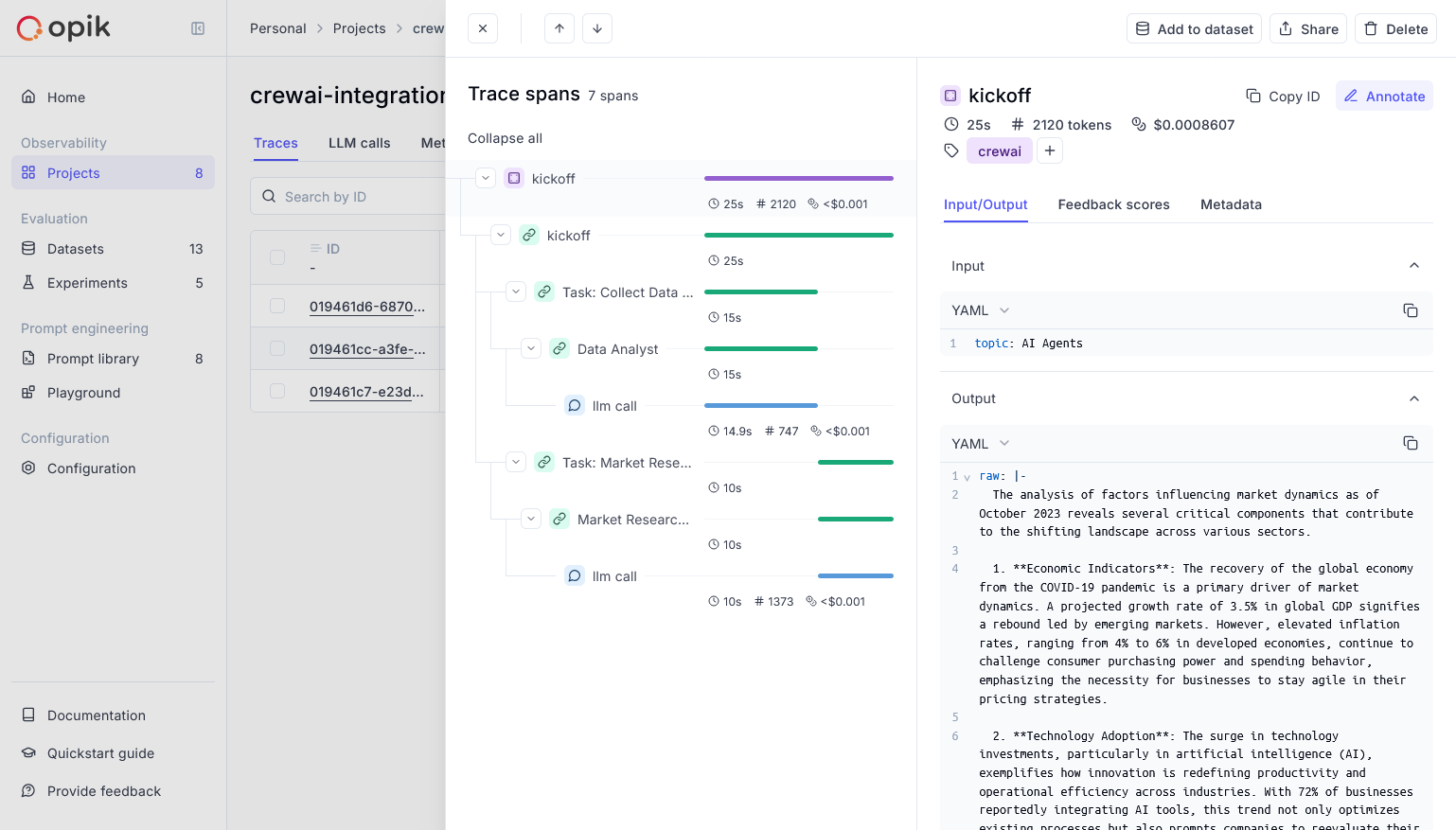
Opik provides comprehensive support for every stage of your CrewAI application development:
- Log Traces and Spans: Automatically track LLM calls and application logic to debug and analyze development and production systems. Manually or programmatically annotate, view, and compare responses across projects.
- Evaluate Your LLM Application’s Performance: Evaluate against a custom test set and run built-in evaluation metrics or define your own metrics in the SDK or UI.
- Test Within Your CI/CD Pipeline: Establish reliable performance baselines with Opik’s LLM unit tests, built on PyTest. Run online evaluations for continuous monitoring in production.
- Monitor & Analyze Production Data: Understand your models’ performance on unseen data in production and generate datasets for new dev iterations.
Comet provides a hosted version of the Opik platform, or you can run the platform locally.
To use the hosted version, simply create a free Comet account and grab you API Key.
To run the Opik platform locally, see our installation guide for more information.
For this guide we will use CrewAI’s quickstart example.
- Install required packages
Terminal window pip install crewai crewai-tools opik --upgrade - Configure Opikimport opikopik.configure(use_local=False)
- Prepare environment
First, we set up our API keys for our LLM-provider as environment variables:
import osimport getpassif "OPENAI_API_KEY" not in os.environ:os.environ["OPENAI_API_KEY"] = getpass.getpass("Enter your OpenAI API key: ") - Using CrewAI
The first step is to create our project. We will use an example from CrewAI’s documentation:
from crewai import Agent, Crew, Task, Processclass YourCrewName:def agent_one(self) -> Agent:return Agent(role="Data Analyst",goal="Analyze data trends in the market",backstory="An experienced data analyst with a background in economics",verbose=True,)def agent_two(self) -> Agent:return Agent(role="Market Researcher",goal="Gather information on market dynamics",backstory="A diligent researcher with a keen eye for detail",verbose=True,)def task_one(self) -> Task:return Task(name="Collect Data Task",description="Collect recent market data and identify trends.",expected_output="A report summarizing key trends in the market.",agent=self.agent_one(),)def task_two(self) -> Task:return Task(name="Market Research Task",description="Research factors affecting market dynamics.",expected_output="An analysis of factors influencing the market.",agent=self.agent_two(),)def crew(self) -> Crew:return Crew(agents=[self.agent_one(), self.agent_two()],tasks=[self.task_one(), self.task_two()],process=Process.sequential,verbose=True,)Now we can import Opik’s tracker and run our crew:
from opik.integrations.crewai import track_crewaitrack_crewai(project_name="crewai-integration-demo")my_crew = YourCrewName().crew()result = my_crew.kickoff()print(result)After running your CrewAI application, visit the Opik app to view:
- LLM traces, spans, and their metadata
- Agent interactions and task execution flow
- Performance metrics like latency and token usage
- Evaluation metrics (built-in or custom)