Arize Phoenix
Arize Phoenix Integration
Section titled “Arize Phoenix Integration”This guide demonstrates how to integrate Arize Phoenix with CrewAI using OpenTelemetry via the OpenInference SDK. By the end of this guide, you will be able to trace your CrewAI agents and easily debug your agents.
What is Arize Phoenix? Arize Phoenix is an LLM observability platform that provides tracing and evaluation for AI applications.
Get Started
Section titled “Get Started”We’ll walk through a simple example of using CrewAI and integrating it with Arize Phoenix via OpenTelemetry using OpenInference.
You can also access this guide on Google Colab.
Step 1: Install Dependencies
Section titled “Step 1: Install Dependencies”pip install openinference-instrumentation-crewai crewai crewai-tools arize-phoenix-otelStep 2: Set Up Environment Variables
Section titled “Step 2: Set Up Environment Variables”Setup Phoenix Cloud API keys and configure OpenTelemetry to send traces to Phoenix. Phoenix Cloud is a hosted version of Arize Phoenix, but it is not required to use this integration.
You can get your free Serper API key here.
import osfrom getpass import getpass
# Get your Phoenix Cloud credentialsPHOENIX_API_KEY = getpass("🔑 Enter your Phoenix Cloud API Key: ")
# Get API keys for servicesOPENAI_API_KEY = getpass("🔑 Enter your OpenAI API key: ")SERPER_API_KEY = getpass("🔑 Enter your Serper API key: ")
# Set environment variablesos.environ["PHOENIX_CLIENT_HEADERS"] = f"api_key={PHOENIX_API_KEY}"os.environ["PHOENIX_COLLECTOR_ENDPOINT"] = "https://app.phoenix.arize.com" # Phoenix Cloud, change this to your own endpoint if you are using a self-hosted instanceos.environ["OPENAI_API_KEY"] = OPENAI_API_KEYos.environ["SERPER_API_KEY"] = SERPER_API_KEY
Step 3: Initialize OpenTelemetry with Phoenix
Section titled “Step 3: Initialize OpenTelemetry with Phoenix”Initialize the OpenInference OpenTelemetry instrumentation SDK to start capturing traces and send them to Phoenix.
from phoenix.otel import register
tracer_provider = register(    project_name="crewai-tracing-demo",    auto_instrument=True,)
Step 4: Create a CrewAI Application
Section titled “Step 4: Create a CrewAI Application”We’ll create a CrewAI application where two agents collaborate to research and write a blog post about AI advancements.
from crewai import Agent, Crew, Process, Taskfrom crewai_tools import SerperDevToolfrom openinference.instrumentation.crewai import CrewAIInstrumentorfrom phoenix.otel import register
# setup monitoring for your crewtracer_provider = register(    endpoint="http://localhost:6006/v1/traces")CrewAIInstrumentor().instrument(skip_dep_check=True, tracer_provider=tracer_provider)search_tool = SerperDevTool()
# Define your agents with roles and goalsresearcher = Agent(    role="Senior Research Analyst",    goal="Uncover cutting-edge developments in AI and data science",    backstory="""You work at a leading tech think tank.    Your expertise lies in identifying emerging trends.    You have a knack for dissecting complex data and presenting actionable insights.""",    verbose=True,    allow_delegation=False,    # You can pass an optional llm attribute specifying what model you wanna use.    # llm=ChatOpenAI(model_name="gpt-3.5", temperature=0.7),    tools=[search_tool],)writer = Agent(    role="Tech Content Strategist",    goal="Craft compelling content on tech advancements",    backstory="""You are a renowned Content Strategist, known for your insightful and engaging articles.    You transform complex concepts into compelling narratives.""",    verbose=True,    allow_delegation=True,)
# Create tasks for your agentstask1 = Task(    description="""Conduct a comprehensive analysis of the latest advancements in AI in 2024.    Identify key trends, breakthrough technologies, and potential industry impacts.""",    expected_output="Full analysis report in bullet points",    agent=researcher,)
task2 = Task(    description="""Using the insights provided, develop an engaging blog    post that highlights the most significant AI advancements.    Your post should be informative yet accessible, catering to a tech-savvy audience.    Make it sound cool, avoid complex words so it doesn't sound like AI.""",    expected_output="Full blog post of at least 4 paragraphs",    agent=writer,)
# Instantiate your crew with a sequential processcrew = Crew(    agents=[researcher, writer], tasks=[task1, task2], verbose=1, process=Process.sequential)
# Get your crew to work!result = crew.kickoff()
print("######################")print(result)
Step 5: View Traces in Phoenix
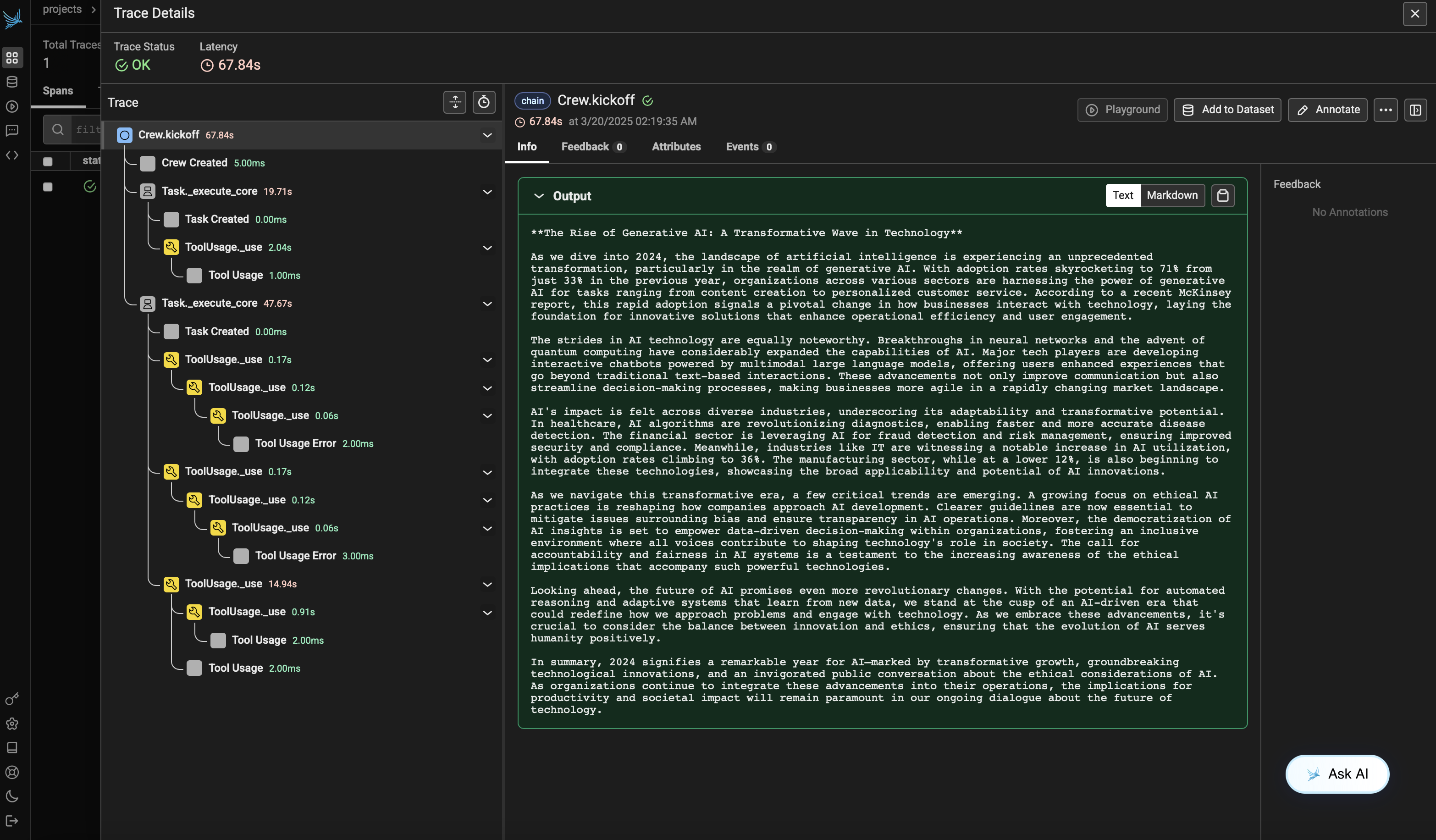
Section titled “Step 5: View Traces in Phoenix”After running the agent, you can view the traces generated by your CrewAI application in Phoenix. You should see detailed steps of the agent interactions and LLM calls, which can help you debug and optimize your AI agents.
Log into your Phoenix Cloud account and navigate to the project you specified in the project_name parameter. You’ll see a timeline view of your trace with all the agent interactions, tool usages, and LLM calls.
Version Compatibility Information
Section titled “Version Compatibility Information”- Python 3.8+
- CrewAI >= 0.86.0
- Arize Phoenix >= 7.0.1
- OpenTelemetry SDK >= 1.31.0
References
Section titled “References”- Phoenix Documentation - Overview of the Phoenix platform.
- CrewAI Documentation - Overview of the CrewAI framework.
- OpenTelemetry Docs - OpenTelemetry guide
- OpenInference GitHub - Source code for OpenInference SDK.