تكامل MLflow
نظرة عامة على MLflow
Section titled “نظرة عامة على MLflow”MLflow هو منصة مفتوحة المصدر لمساعدة ممارسي تعلم الآلة والفرق في التعامل مع تعقيدات عملية تعلم الآلة.
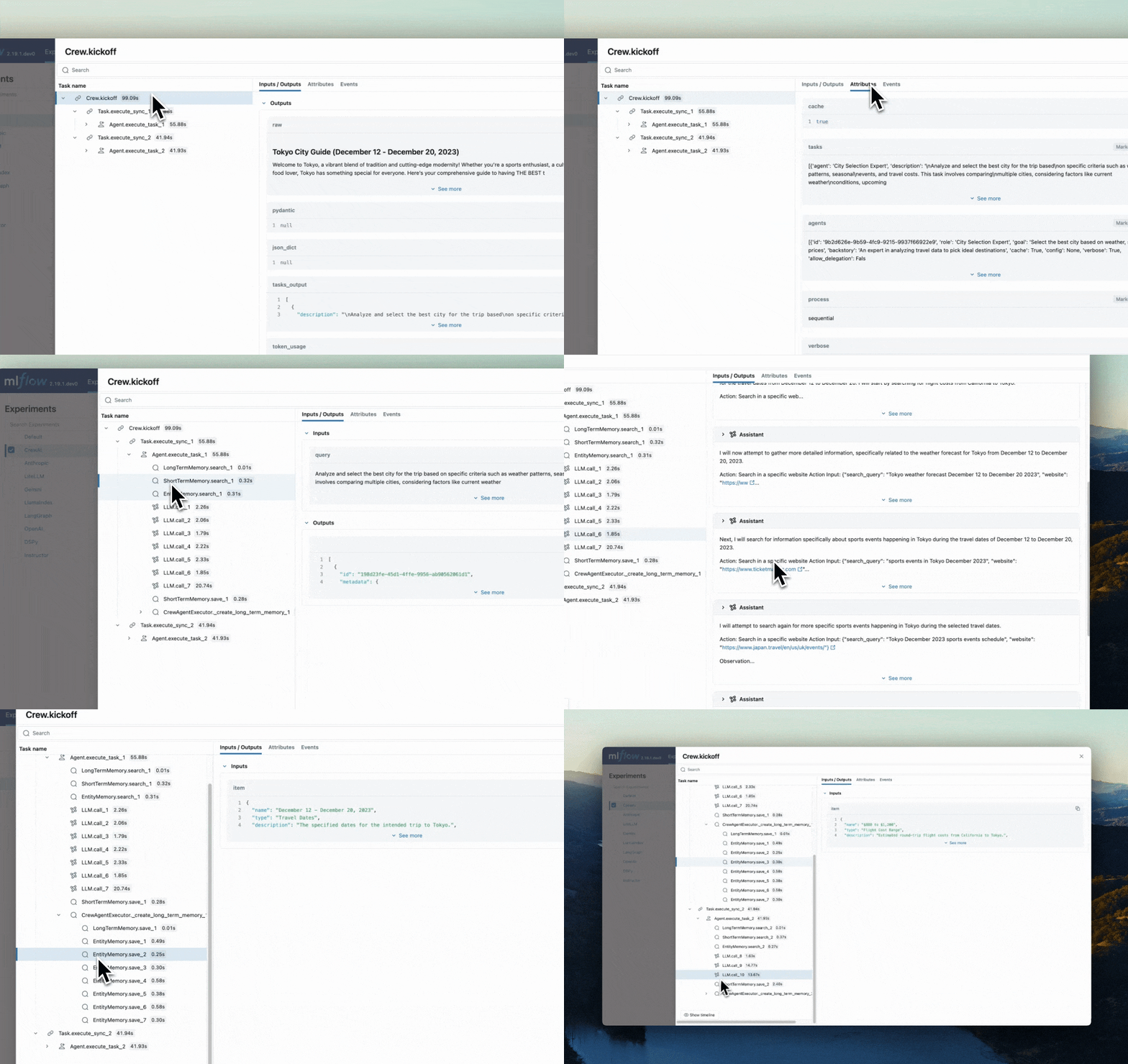
يوفر ميزة التتبع التي تعزز قابلية مراقبة نماذج اللغة الكبيرة (LLM) في تطبيقات الذكاء الاصطناعي التوليدي الخاصة بك من خلال التقاط معلومات تفصيلية حول تنفيذ خدمات تطبيقك. يوفر التتبع طريقة لتسجيل المدخلات والمخرجات والبيانات الوصفية المرتبطة بكل خطوة وسيطة في الطلب، مما يتيح لك تحديد مصدر الأخطاء والسلوكيات غير المتوقعة بسهولة.
الميزات
Section titled “الميزات”- لوحة معلومات التتبع: راقب أنشطة وكلاء crewAI الخاصين بك من خلال لوحات معلومات تفصيلية تتضمن المدخلات والمخرجات والبيانات الوصفية للنطاقات.
- التتبع الآلي: تكامل مؤتمت بالكامل مع crewAI، يمكن تفعيله عبر تشغيل
mlflow.crewai.autolog(). - أدوات التتبع اليدوي بأقل مجهود: خصّص أدوات التتبع من خلال واجهات برمجة التطبيقات عالية المستوى من MLflow مثل المزخرفات وأغلفة الدوال ومديري السياق.
- التوافق مع OpenTelemetry: يدعم تتبع MLflow تصدير التتبعات إلى جامع OpenTelemetry، الذي يمكن استخدامه بعد ذلك لتصدير التتبعات إلى خلفيات متنوعة مثل Jaeger وZipkin وAWS X-Ray.
- تغليف ونشر الوكلاء: قم بتغليف ونشر وكلاء crewAI الخاصين بك إلى خادم استدلال مع مجموعة متنوعة من أهداف النشر.
- استضافة آمنة لنماذج LLM: استضف نماذج LLM متعددة من مزودين مختلفين في نقطة نهاية موحدة من خلال بوابة MLflow.
- التقييم: قيّم وكلاء crewAI الخاصين بك باستخدام مجموعة واسعة من المقاييس عبر واجهة برمجة تطبيقات مريحة
mlflow.evaluate().
تعليمات الإعداد
Section titled “تعليمات الإعداد”- تثبيت حزمة MLflow
Terminal window # The crewAI integration is available in mlflow>=2.19.0pip install mlflow - بدء خادم تتبع MLflow
Terminal window # This process is optional, but it is recommended to use MLflow tracking server for better visualization and broader features.mlflow server - تهيئة MLflow في تطبيقك
أضف السطرين التاليين إلى كود تطبيقك:
import mlflowmlflow.crewai.autolog()# Optional: Set a tracking URI and an experiment name if you have a tracking servermlflow.set_tracking_uri("http://localhost:5000")mlflow.set_experiment("CrewAI")مثال على الاستخدام لتتبع وكلاء CrewAI:
from crewai import Agent, Crew, Taskfrom crewai.knowledge.source.string_knowledge_source import StringKnowledgeSourcefrom crewai_tools import SerperDevTool, WebsiteSearchToolfrom textwrap import dedentcontent = "Users name is John. He is 30 years old and lives in San Francisco."string_source = StringKnowledgeSource(content=content, metadata={"preference": "personal"})search_tool = WebsiteSearchTool()class TripAgents:def city_selection_agent(self):return Agent(role="City Selection Expert",goal="Select the best city based on weather, season, and prices",backstory="An expert in analyzing travel data to pick ideal destinations",tools=[search_tool,],verbose=True,)def local_expert(self):return Agent(role="Local Expert at this city",goal="Provide the BEST insights about the selected city",backstory="""A knowledgeable local guide with extensive informationabout the city, it's attractions and customs""",tools=[search_tool],verbose=True,)class TripTasks:def identify_task(self, agent, origin, cities, interests, range):return Task(description=dedent(f"""Analyze and select the best city for the trip basedon specific criteria such as weather patterns, seasonalevents, and travel costs. This task involves comparingmultiple cities, considering factors like current weatherconditions, upcoming cultural or seasonal events, andoverall travel expenses.Your final answer must be a detailedreport on the chosen city, and everything you found outabout it, including the actual flight costs, weatherforecast and attractions.Traveling from: {origin}City Options: {cities}Trip Date: {range}Traveler Interests: {interests}"""),agent=agent,expected_output="Detailed report on the chosen city including flight costs, weather forecast, and attractions",)def gather_task(self, agent, origin, interests, range):return Task(description=dedent(f"""As a local expert on this city you must compile anin-depth guide for someone traveling there and wantingto have THE BEST trip ever!Gather information about key attractions, local customs,special events, and daily activity recommendations.Find the best spots to go to, the kind of place only alocal would know.This guide should provide a thorough overview of whatthe city has to offer, including hidden gems, culturalhotspots, must-visit landmarks, weather forecasts, andhigh level costs.The final answer must be a comprehensive city guide,rich in cultural insights and practical tips,tailored to enhance the travel experience.Trip Date: {range}Traveling from: {origin}Traveler Interests: {interests}"""),agent=agent,expected_output="Comprehensive city guide including hidden gems, cultural hotspots, and practical travel tips",)class TripCrew:def __init__(self, origin, cities, date_range, interests):self.cities = citiesself.origin = originself.interests = interestsself.date_range = date_rangedef run(self):agents = TripAgents()tasks = TripTasks()city_selector_agent = agents.city_selection_agent()local_expert_agent = agents.local_expert()identify_task = tasks.identify_task(city_selector_agent,self.origin,self.cities,self.interests,self.date_range,)gather_task = tasks.gather_task(local_expert_agent, self.origin, self.interests, self.date_range)crew = Crew(agents=[city_selector_agent, local_expert_agent],tasks=[identify_task, gather_task],verbose=True,memory=True,knowledge={"sources": [string_source],"metadata": {"preference": "personal"},},)result = crew.kickoff()return resulttrip_crew = TripCrew("California", "Tokyo", "Dec 12 - Dec 20", "sports")result = trip_crew.run()print(result)راجع وثائق تتبع MLflow لمزيد من الإعدادات وحالات الاستخدام.
- عرض أنشطة الوكلاء
الآن يتم التقاط تتبعات وكلاء crewAI الخاصين بك بواسطة MLflow. لنقم بزيارة خادم تتبع MLflow لعرض التتبعات والحصول على رؤى حول وكلائك.
افتح
127.0.0.1:5000في متصفحك لزيارة خادم تتبع MLflow.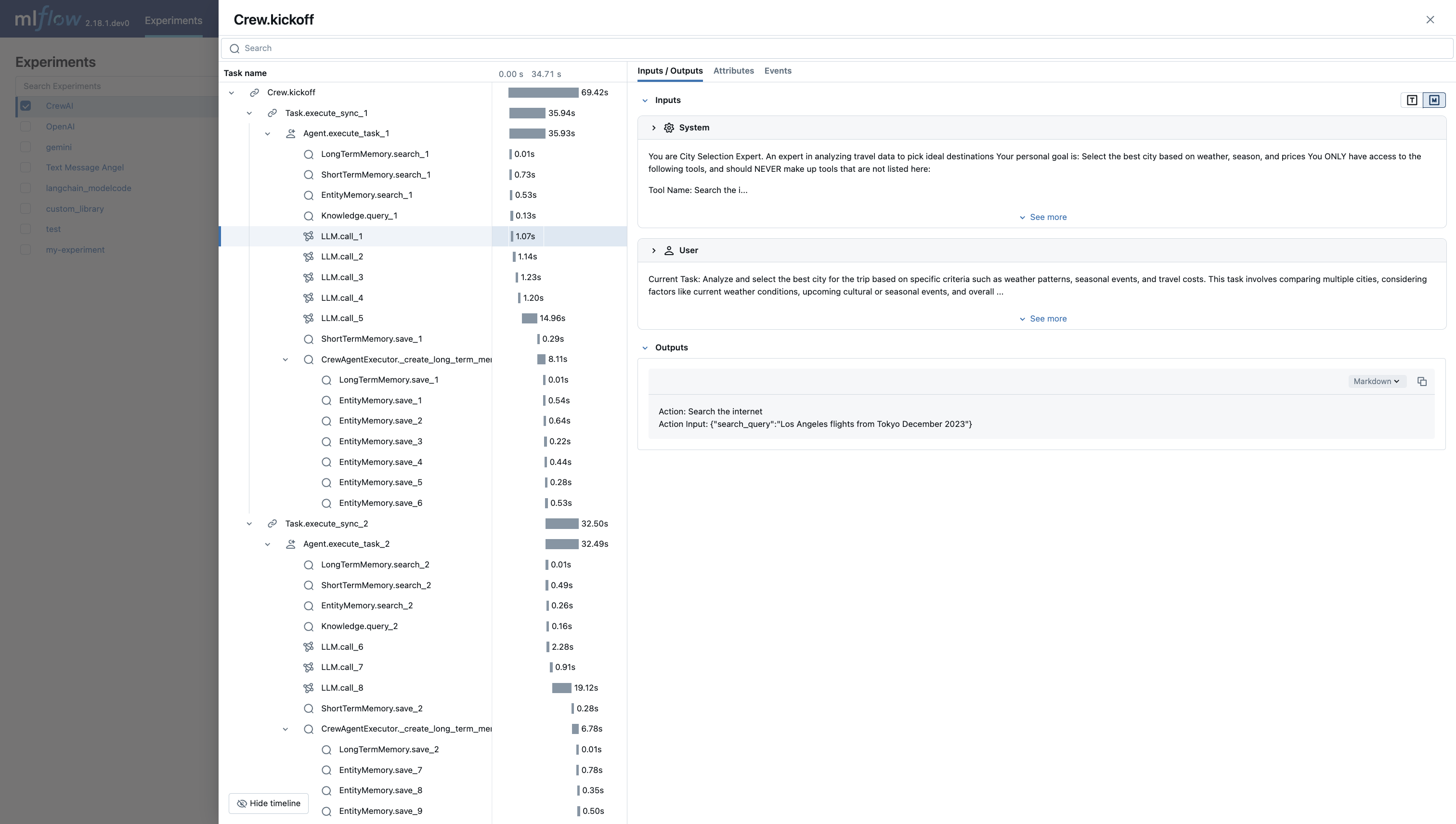
لوحة معلومات تتبع MLflow